

SHEALD Inc. has released version 2.2 of Pilot eLog. The program contains 17 different reports and endorsements, online links to FAA and FAR reference sites, the complete text of many logbook-related FARs, and provides immediate viewing of day, night and instrument currency plus BFR and medical expiration dates. It is available in versions for Mac OS X and Microsoft Windows.
Donald Ryan, president of SHEALD Inc. and an avid general aviation pilot, said after he spent “significant time and research seeking a viable straightforward, intuitive electronic logbook,” he decided to develop his own that would be fully cross-platform compatible. “Pilots should have an easy to use cross-platform logbook program,” he said. “Most programs on the market are way too complex. The logbook is a basic pilot function and should be something that is familiar and easy to use, yet powerful enough to provide advanced features.”
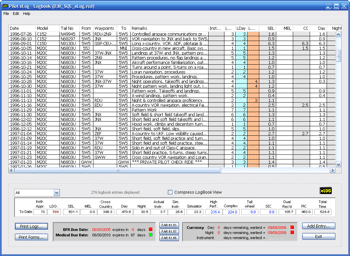 The main logbook screen acts as the central information center providing key information to pilots at a glance – no need to drill through countless menus or windows, he said. The top half of the screen shows the most recent logbook entries — just like a paper logbook. The lower section provides summary totals and currency information. The currency and date expirations are clearly color-coded to visually alert the pilot well in advance of expiration without the need for pop-up windows.
Total flight time is recorded using either Hobbs Start/Stop time or as a direct entry. Log entries incorporate extensive error checking to keep logs accurate. Accelerator keys make data entry fast and painless, he said. Pilots can begin their logbooks from any point in time, record historical totals, then begin using Pilot eLog for entries going forward. Recording of a new endorsement, rating or BFR check ride automatically updates BFR expiration information. The system automatically tracks Day, Night and Instrument currency and keeps this information visible on the main screen at all times.
Logbook data is stored locally on the pilot’s computer. Built-in backup and restore functions ensure long-term data integrity, he said.
For more information: SHEALD.net

We need to talk to the Sheald folks about their product and there is no telephone number listed, nor address on their site. When you try to insert a comment in their form you need to have already bought their product and have entered a product number. This is not cool. How are you supposed to buy if you can’t ask questions.