

Many of today’s products and services got their start as a solution to someone’s “problem.”
Where2Fly2 is the latest example of just such a thing.
After Michael Ladd earned his pilot certificate in 2006 he did what many new pilots do. He took friends up for flights to see the area from above.
At the time, he used an app called IFlyWhere to look for new and fun places to fly.
“I even used the app while traveling, even when I wasn’t flying, to find local airports to visit,” said Michael. “But they stopped developing it.”
And that’s where the idea for Where2Fly2 came from.
Michael has a 25-year career in tech, mostly in the database segment of the tech world. Behind the scenes, if you will.
Using his knowledge of databases, Michael decided to learn how to develop an iOS app to bring his idea to life.
A few years later — this was a sideline project after all — Where2Fly2 now exists.
How it works
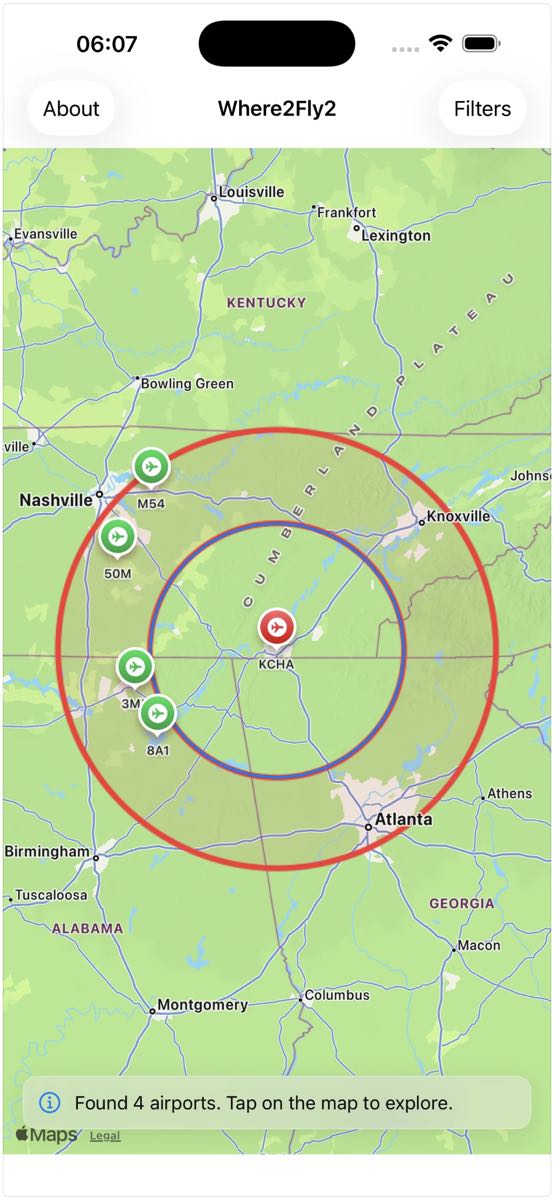
Once the app is loaded to your iPhone or iPad, launch the app. You are immediately taken to the search page. Enter the origin airport identifier, select the minimum and maximum distance you’d like to explore, as well as runway length and surface. Then tap the “Find Airports” button and a nice map pops up with public use airports in the distance ring you selected.
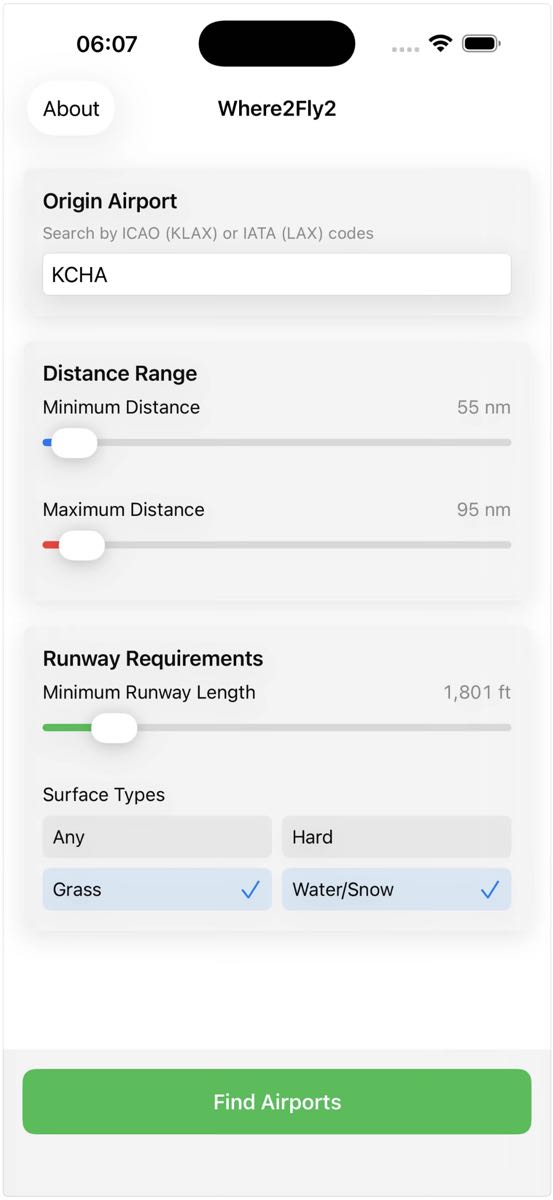
It’s that easy.
Then the normal pinch, zoom, scroll features allow you to navigate around the map. Tap on one of the icons and you’ll see basic FAA-based data and a link to Airnav for more information.
“Only public use airports are included at this point,” said Michael.
He didn’t want to cause trouble for himself, pilots, or private airport owners by including private use-only airports in this version.
The app is priced at $3.99, after a 10-day free trial. That’s a one-time fee, not a subscription.
“I’m not a fan of subscription-based apps,” noted Michael. “Subscription overload is a real thing.”
He will continue to develop the app.
Early adopters have offered feedback and some feature requests. And Michael would like to make a few improvements to the map.
Where2Fly2 does one thing. And it does it well.
Better yet, it also solves Michael’s “problem.” Maybe it will solve yours as well.
Congratulations Michael.
Find Where2Fly2 in the Apple App Store.

Downloaded, installed and opened. doesn’t work. I entered the origin airport, KFCI, set the distance parameters and runway surface. “Find Airports” button non-responsive. Oh well. Nice idea.
Will there be a version for none Apple phones?
Hi,
App doesn’t seem to be available in Europe? Is that right?
Thanks.