

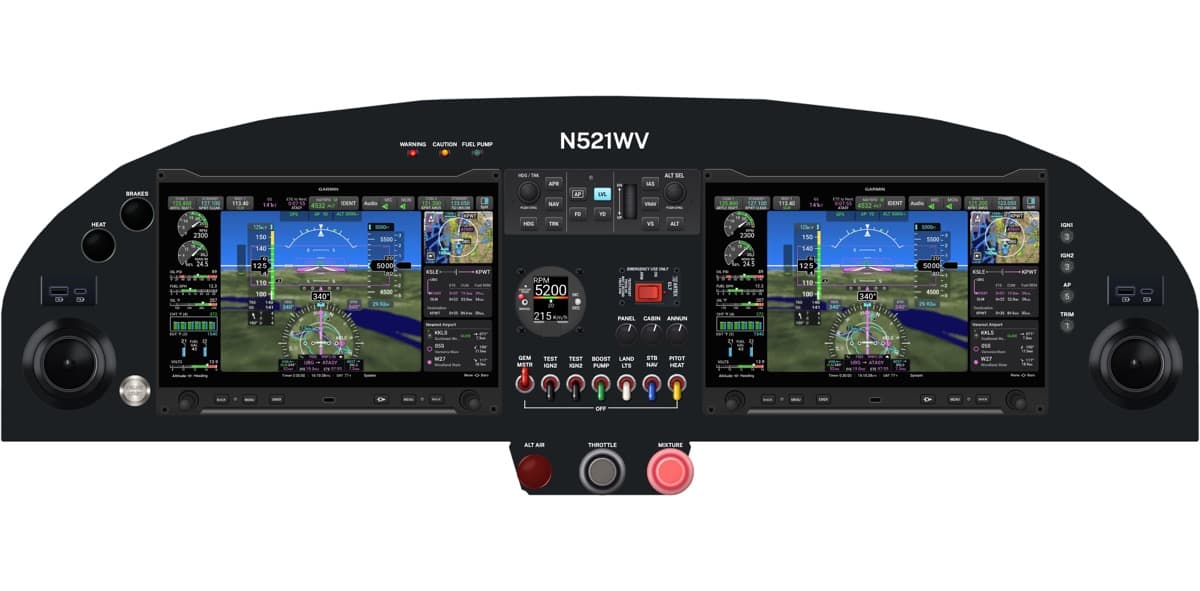
Hangar Flying has updated its Panel Designer, a web tool that helps builders of experimental aircraft design their instrument panels.
The Panel Designer is a web tool for laying out an aircraft instrument panel to scale. You pick the panel for your aircraft, drag instruments onto it at their true size, and see what fits, company officials explained.
New features include:
- A new level of accuracy: Every panel and every instrument has been redrawn to its real dimensions. Knobs, screws, and cutouts are where they are on the real part. The drawings stay sharp at any zoom, on the screen and in the picture you export.
- Custom panel colors: See the panel in any color you choose.
- What is behind the panel: Each panel shows where it fastens to the airframe and where structure limits how deep an instrument can go. You see what will not fit on the screen, not in the shop.
- Add-on panels: Add a center console, a switch panel, or a subpanel in the size you need, and lay it out beside the main panel.
- Placards: Write your own labels and place them anywhere, in any colors.
- Switches and circuit breakers: Toggle switches come in colors, so each function is easy to tell apart. Circuit breakers show the rating you choose.
- An equipment list: The Panel Designer lists every instrument on your panel with its quantity and price. One click adds them to your aircraft’s equipment list on Hangar Flying.
- Featured designs, and templates for every aircraft in the library: Look through panels other builders have finished. Each aircraft has its own page with its panels.
The Panel Designer runs in a web browser. There is nothing to install. Anyone with an account can lay out a panel, see its equipment list, and export a picture. A membership is $99 a year and opens every tool.
The same membership covers every app on Hangar Flying. Together they follow an aircraft from the first rivet through its years of flying:
- Marketplace, open now. Aircraft and aviation property for sale, listed by their owners.
- Builders Log, in early testing. The record of a build: Entries, photographs, and hours.
- MRO, in early testing. An aircraft’s maintenance records, with airworthiness directives checked against the equipment installed.
For more information: HangarFlying.com/Panel
Leave a Reply